Packeta Widget update guide
In order to provide better services and maintain compatibility, older versions of the Packeta Widget will stop working on April 1, 2025. We strongly recommend updating to the latest version to ensure continued functionality.
This guide outlines all the necessary steps to update your implementation.
How to Identify Issues
The widget now features a built-in diagnostic tool.
- Open the widget on your website.
- Check the top-right corner for a red or black dot.
- Click the dot to view the current version and any update requirements.
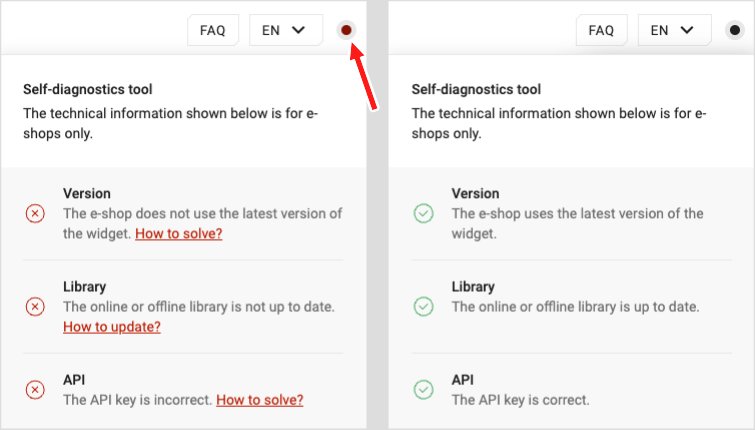
You are using an unsupported version if the dot is missing, and it will stop working on April 1, 2025. We strongly recommend updating to a supported version as soon as possible.
Please note that the HD widget is not affected by this update and will continue to function as expected beyond the specified date.
If you encounter any issues while using a third-party solution, it is essential to share this information with your supplier or service provider. Providing these details will help them ensure that the solution is properly integrated and functioning as intended.
Critical: Version
The following versions are deprecated and require updating to v6 for continued functionality.
How to update
- If you are using Pick-up Point services:
- Update the widget URL to the latest version (v6) and ensure that your API key is correctly configured.
- For detailed instructions, refer to the PUDO Delivery - Widget Guide.
- Example implementations are available at Examples - Packeta PUDOs and Examples - Carrier PUDOs.
- If you are using Home Delivery services:
- No changes are required for your current setup.
Critical/Important: Library
Deprecated libraries must be replaced with the latest version:
| Deprecated library | Replace with |
|---|---|
branch.js | library.js |
packetaWidget.js | library.js |
widget-depracated.packeta.com | library.js |
| Any custom solution | library.js |
Note: If you plan to continue using a custom library, please ensure it is updated to support widget v6 compatibility.
How to Update
- If you are using Pick-up Point services:
- Update the library to the latest version and ensure that your API key is correctly configured.
- For detailed instructions, refer to the PUDO Delivery - Widget Guide.
- Example implementations are available at Examples - Packeta PUDOs and Examples - Carrier PUDOs.
- If you are using Home Delivery services:
- No changes are required for your current setup.
Important: API Key
If your widget is not working correctly, it may be due to an incorrect API key. Make sure you are using the correct API key associated with your account in your implementation.
Using the correct API key in your implementation is essential because it ensures that all your settings, such as the selected country, visible pick-up points, Z-BOXes, external carriers, and more, are properly applied.
You can manage these settings in the client section, specifically on the Allowed Branch Settings page.
How to update
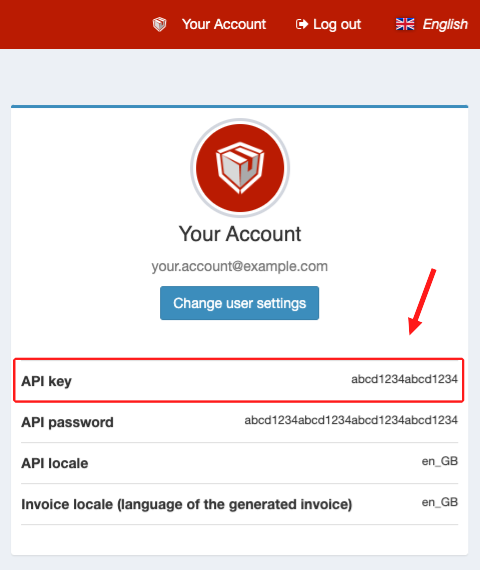
- Locate your API key
- Log in to the Packeta client section and find your API key in the User Support section.
- Implement the correct API key
- Use the API key provided in your widget's implementation.
Always use the API Key, not the API Password.
Using an API password will expose it on your website, which poses serious security risks. Additionally, the widget will not function correctly if the API Password is used, and the implementation will be deemed incorrect.
Contact us
If you have any questions, you can contact your Sales Manager. The contact email is available in the client section under User Support.
Additionally, our integrations team at integrations@packeta.com is ready to assist you.