Custom labels
If you choose to create your own packet labels, it is crucial to incorporate all of the essential data.
Regardless of whether a custom label is being used, it is mandatory to provide the packet data via the API using the createPacket method.
Create standard A6 label
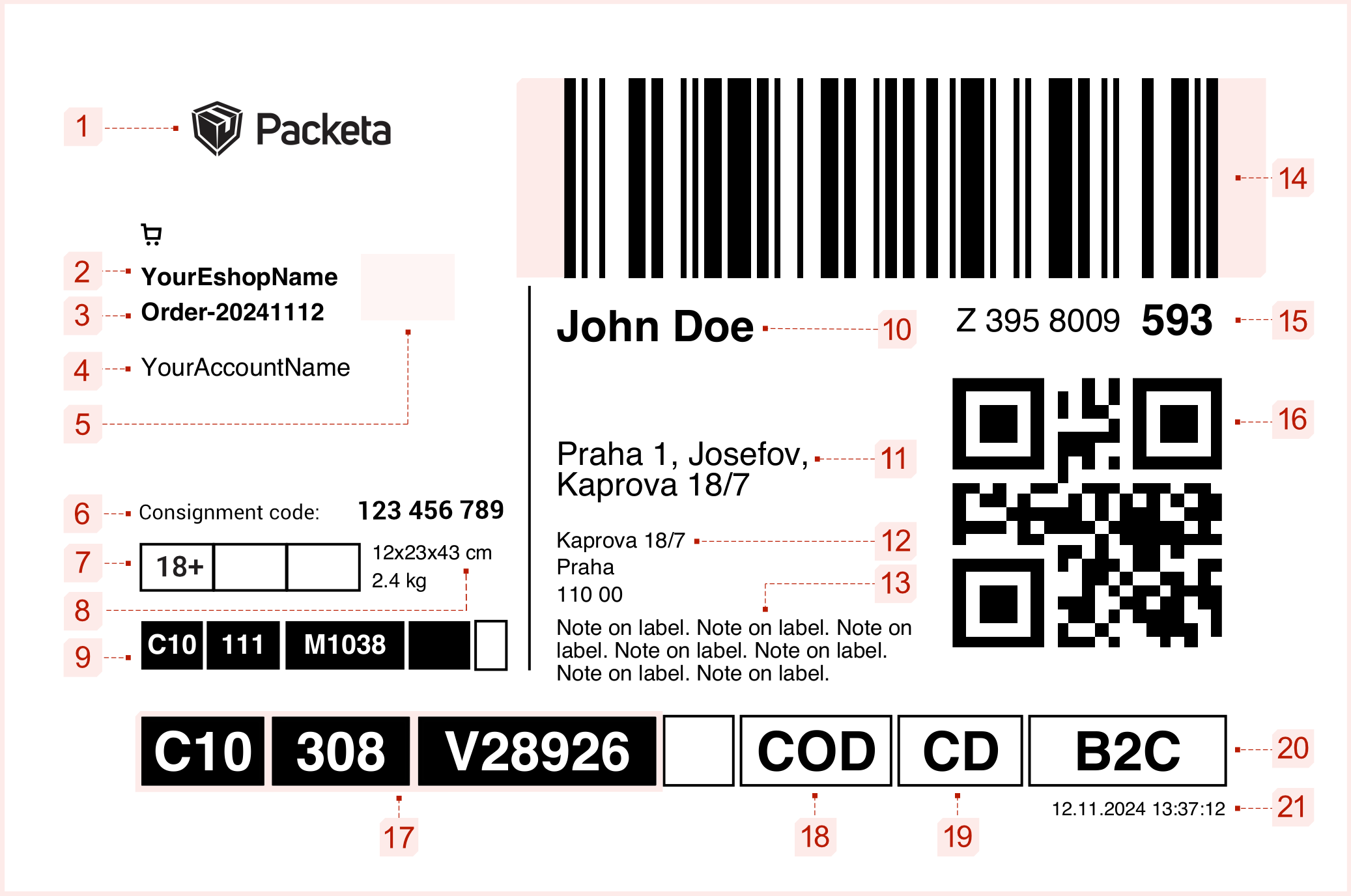
Label description
- Packeta Logo (1)
- Sender's details (2-8)
- Recipient's details (9-12)
- Barcode and packet number (13-15)
- Routing details (16-20)
- Dimensions and font
- Name of your e-shop (size: 9 pt, bold)
- the e-shop's name can be configured in your client section under the Senders category
- Number of your purchase order (size: 9 pt, bold, refer to Dimensions and font tab)
- Name of your account (size: 9 pt)
- accessible from the client section in the top-right corner
- to change it, reach out to your assigned sales manager
- E-shop logo - optional
- Consignment code - B2C Z-BOX consignment code
- Dimensions and weight of the packet (size: 7.5 pt)
- Extra services
- age verification (only if age verification is required, otherwise leave empty)
- signature (only if signature is required, otherwise leave empty)
- reserved for future purposes
- Z-BOX delivery does not support extra services
- Routing codes for packet returns (size: 10 pt, bold)
- sets of strings split by a vertical line
- these codes assist in accurate tracking of the packet when a return occurs
- our system creates these strings dynamically based on the billing address of the e-shop, you can obtain them using
senderGetReturnRouting()API method
- Name and Surname of the recipient (size: 16 pt, bold, refer to Dimensions and font tab)
- Name of the Pick-up Point (size: 12 pt)
- available through Packeta Pick-up Points feed using the
labelNameparameter from the target pick-up point
- available through Packeta Pick-up Points feed using the
- Address of the Pick-up Point (size: 8 pt)
- available through Packeta Pick-up Points feed by combining the
street,city, andzipparameters
- available through Packeta Pick-up Points feed by combining the
- Note on the label - optional (size: 8 pt)
- Barcode
- tracking code in the format of a barcode using the Code 128 symbology
- the structure for the tracking code should be
Z1234567890 - Enclose the barcode with a quiet zone, an empty space on both sides of the barcode. Make sure the barcode's last line isn't too close to the edge of the paper. The quiet zone should ideally be 10 times the width of the barcode's thinnest line (generally between 0.5 cm and 1 cm).
- for further specifics on quiet zones, refer to barcode-labels.com
- Formatted text version of the tracking code (size: letter “Z” and first 7 digits 12 pt, last 3 digits 14 pt, bold)
- to be displayed below the barcode, structured like this:
Z 123 4567 890 - the last three digits should be notably larger than the rest of the number
- to be displayed below the barcode, structured like this:
- QR code (size: 35 × 35 mm)
- encodes the packet’s tracking number (35 × 35 mm)
- the structure for the tracking code should be
Z1234567890
- Packet routing code (size: 20 pt, bold)
- routing code of the destination branch or external carrier is printed in white on black
- routing code available through Packeta Pick-up Points feed as the
labelRoutingof the destination branch
- Cash-On-Delivery (COD) (size: 20 pt, bold)
- necessary for packets requiring cash on delivery (otherwise leave empty)
- Delivery method type (size: 20 pt, bold)
- CD = pick-up point delivery
- HD = home delivery
- ZB = Z-BOX delivery
- Service type (size: 20 pt, bold)
- standard value is B2C, unless you use different services
- Label creation date (size: 7 pt)
- corresponds to the date and time when the label is created
The following dimensions apply to all types of Packeta’s labels:
- Labels are formatted in A6 size, with a landscape orientation
- Helvetica font is used for all text strings
- Points correspond to standard PostScript Points, with a density of 72 ppi
- Name and Surname:
- For a length of 34 characters or fewer, a font size of 16 pt
- For a length exceeding 34 characters, a font size of 13 pt
- Order Number:
- For a length of 27 characters or fewer, a font size of 9 pt
- For a length exceeding 28 characters, a 6.5 pt font size
Extend standard A6 label
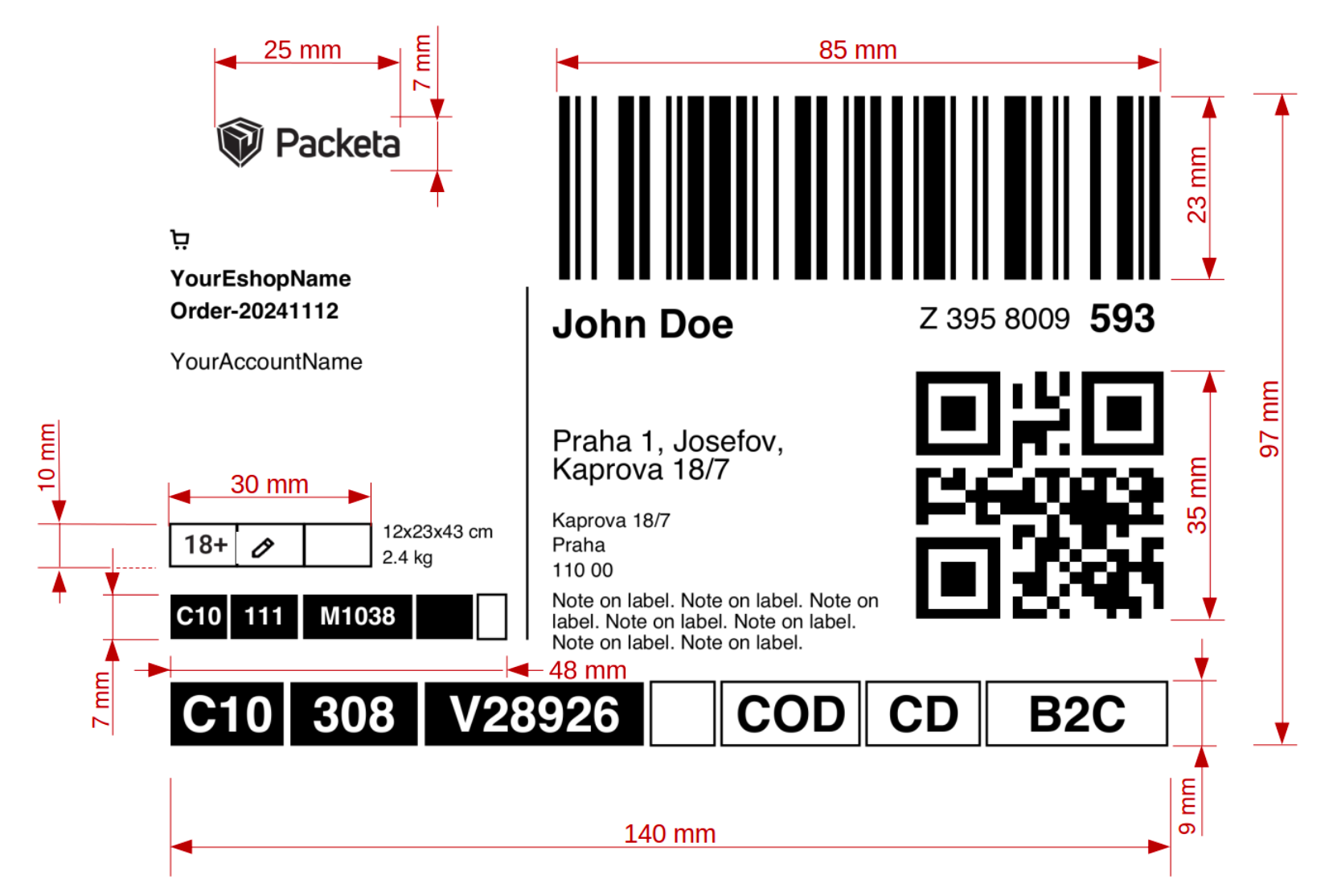
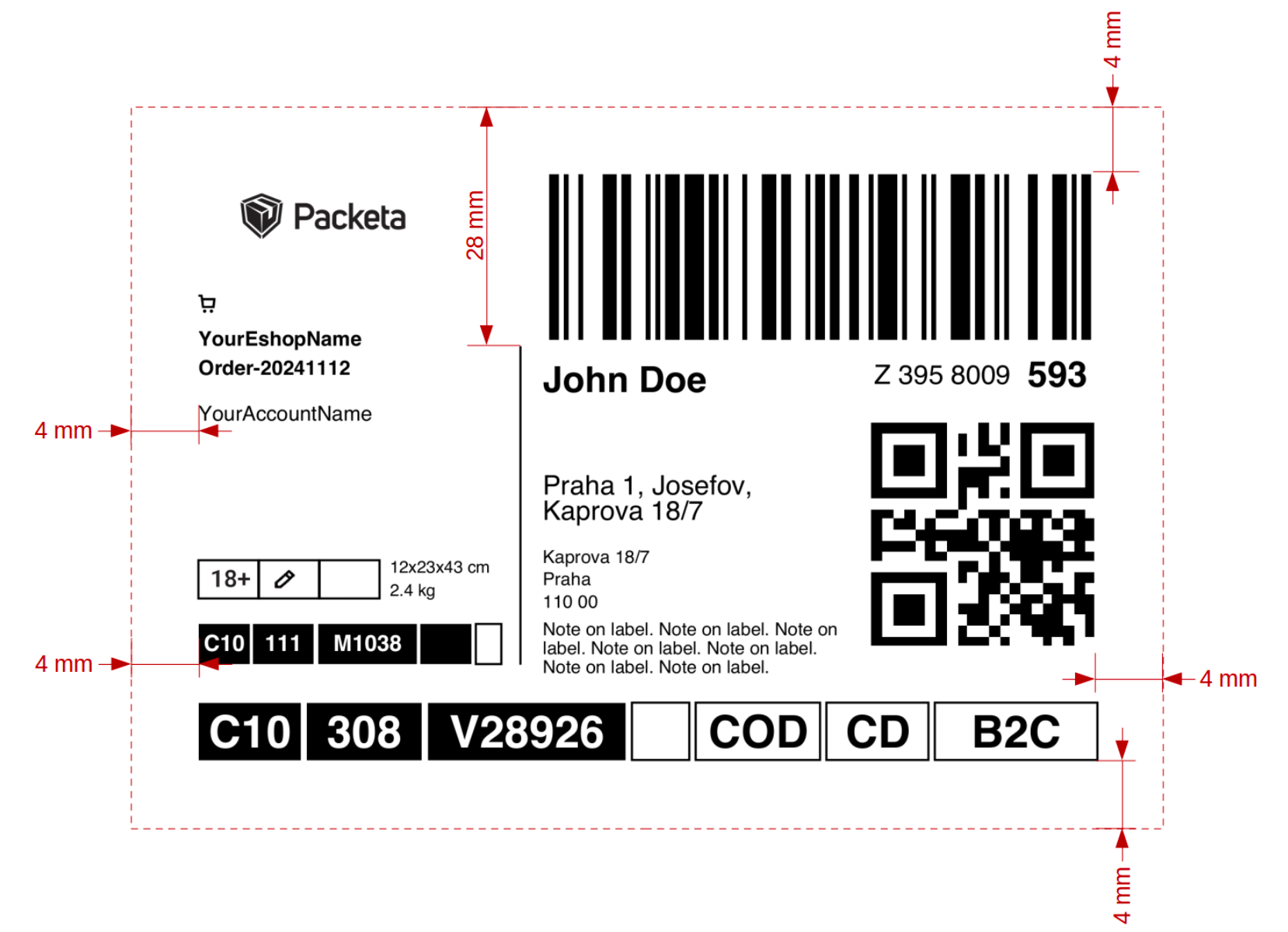
If you need to extend standard Packeta A6 label, you can do it by the following instructions:
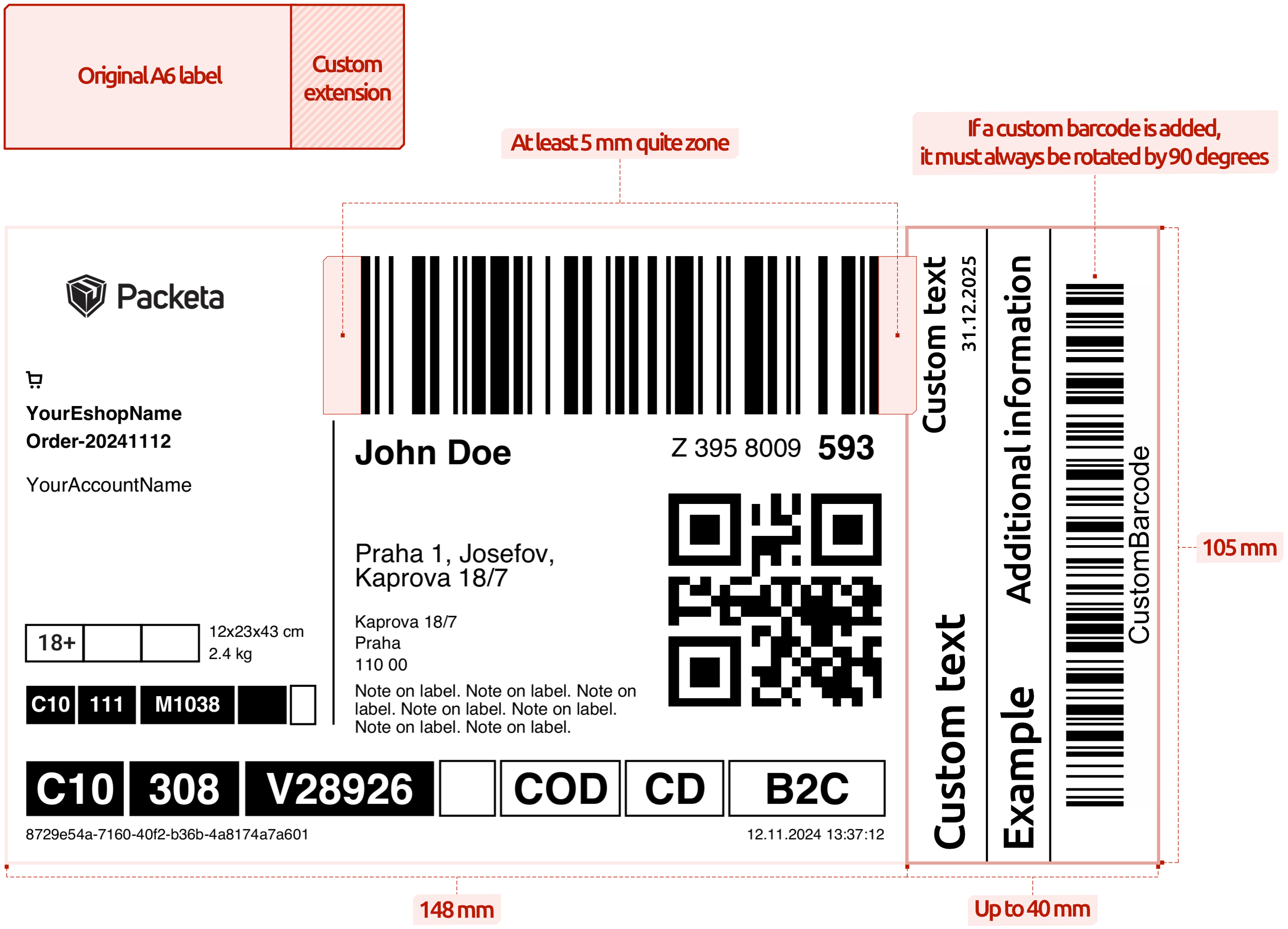
Label description
- Original Packeta label cannot be altered in any way - that includes also downsizing
- Extension of the label is possible only by extending A6 format
- Extension cannot be wider than 40 mm
- Any barcode on the extension has to be rotated by 90 degrees
- Quite zone from each side of the barcode has to be respected (at least 5 mm, 10mm recommended)
Extended label must be approved by Packeta Integration Support at integrations@packeta.com before physical use.
Create Return label
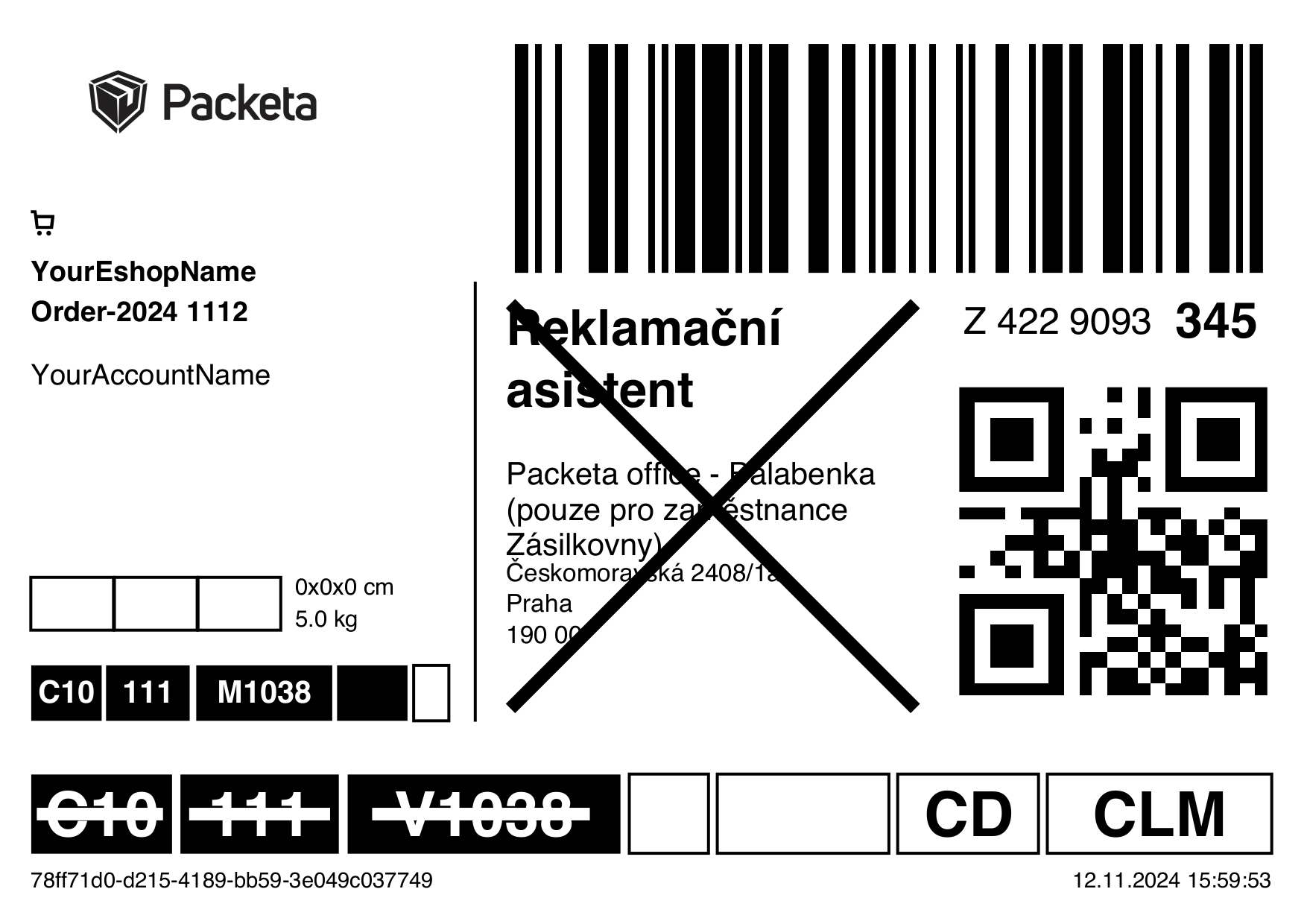
When you make use of the Return service and decide to print these labels independently, divergent from customary labels, it is required to replace the recipient's address with the highlighted term Claim Assistant. Ensure that this term is struck through and clearly visible.