Returns
There are three ways to create return packets:
- API - Automated return creation
- Return portal - Customer self-service
- Client section - Manual return creation
The pick-up point for return packets cannot be chosen dynamically. It is based on the billing address in the Client section → Invoice Addresses. For pricing and return addresses for countries outside Packeta network, see our website.
Return packet flow
Below you can see a diagram of a return packet flow and its statuses.
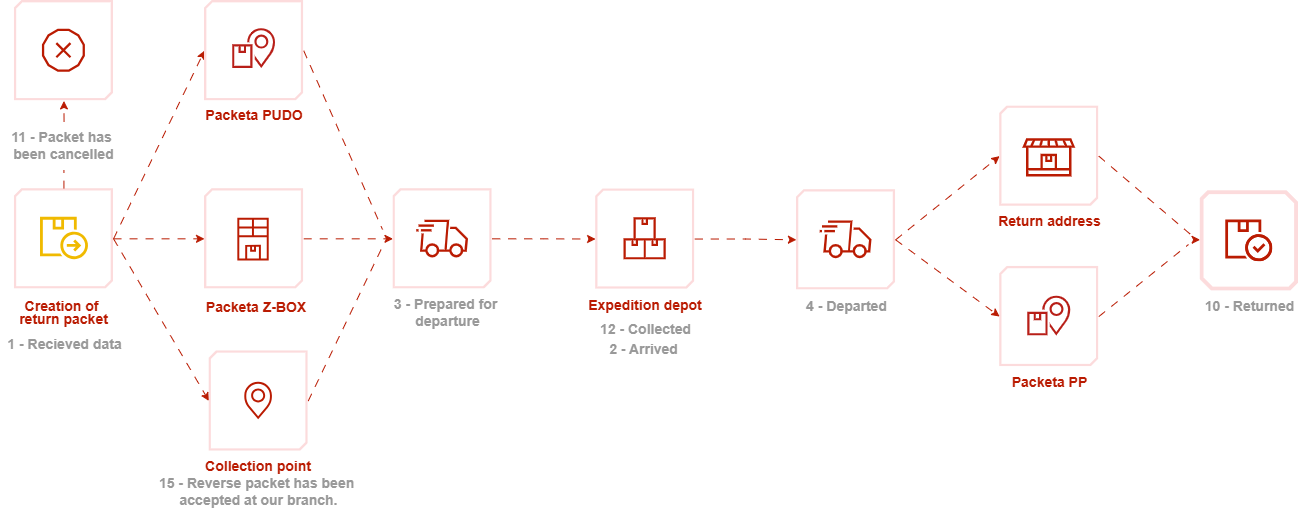
Collection point is an address used for packets originating from countries without native Packeta network. Find the return address for each country on our website.
Return via API
Return via API is a service that can be used to easily allow customers to return their packets to the e-shop. The e-shop creates a unique password for submission at a drop-off point or Z-BOX using createPacketClaimWithPassword().
On success returns PacketDetail with information about the newly created packet.
Return workflow:
- Create a return password using
createPacketClaimWithPassword(). - Provide the generated password to the customer.
- The customer submits the packet at a Packeta drop-off point or Z-BOX.
- Packeta creates and processes the return packet.
Example createPacketClaimWithPassword() request/response
createPacketClaimWithPassword() request/response- REST
- SOAP
- PHP
- C#
- Node.js
<!--request-->
<createPacketClaimWithPassword>
	<apiPassword>{{API_PASSWORD}}</apiPassword>
	<claimWithPasswordAttributes>
		<number>claimNumber</number>
		<email>example@packetatest.com</email>
		<phone>+420777777777</phone>
		<value>100.00</value>
		<currency>CZK</currency>
		<eshop>{{SENDER_INDICATION}}</eshop>
		<consignCountry>CZ</consignCountry>
		<sendEmailToCustomer>false</sendEmailToCustomer>
	</claimWithPasswordAttributes>
</createPacketClaimWithPassword>


<!--response-->
<?xml version="1.0" encoding="utf-8"?>
<response>
	<status>ok</status>
	<result>
		<id>1234567890</id>
		<barcode>Z1234567890</barcode>
		<barcodeText>Z 123 4567 890</barcodeText>
		<password>123456789</password>
	</result>
</response>
<!--request-->
<soapenv:Envelope xmlns:soapenv="http://schemas.xmlsoap.org/soap/envelope/" xmlns:soap="http://www.zasilkovna.cz/api/soap.wsdl2" xmlns:soap1="http://www.zasilkovna.cz/api/soap.wsdl">
	<soapenv:Header/>
	<soapenv:Body>
		<soap:createPacketClaimWithPassword>
			<apiPassword>{{API_PASSWORD}}</apiPassword>
			<claimWithPasswordAttributes>
				<soap1:number>claimNumber</soap1:number>
				<soap1:email>example@packetatest.com</soap1:email>
				<soap1:phone>+420777777777</soap1:phone>
				<soap1:value>100</soap1:value>
				<soap1:currency>CZK</soap1:currency>
				<soap1:eshop>{{SENDER_INDICATION}}</soap1:eshop>
				<soap1:consignCountry>CZ</soap1:consignCountry>
				<soap1:sendEmailToCustomer>false</soap1:sendEmailToCustomer>
			</claimWithPasswordAttributes>
		</soap:createPacketClaimWithPassword>
	</soapenv:Body>
</soapenv:Envelope>

<!--response-->
<?xml version="1.0" encoding="utf-8"?>
<SOAP-ENV:Envelope xmlns:SOAP-ENV="http://schemas.xmlsoap.org/soap/envelope/" xmlns:ns1="http://www.zasilkovna.cz/api/soap.wsdl">
	<SOAP-ENV:Body>
		<ns1:createPacketClaimWithPasswordResponse>
			<createPacketClaimWithPasswordResult>
				<ns1:id>1234567890</ns1:id>
				<ns1:barcode>Z1234567890</ns1:barcode>
				<ns1:barcodeText>Z 123 4567 890</ns1:barcodeText>
				<ns1:password>123456789</ns1:password>
			</createPacketClaimWithPasswordResult>
		</ns1:createPacketClaimWithPasswordResponse>
	</SOAP-ENV:Body>
</SOAP-ENV:Envelope>
<?php

$apiPassword = 'apiPassword';

$claimAttributes = [
	'number' => '20220513001',
	'email' => 'example@packetatest.com',
	'phone' => '603603603',
	'value' => '100',
	'currency' => 'CZK',
	'eshop' => '{{SENDER_INDICATION}}',
	'consignCountry' => 'CZ',
	'sendEmailToCustomer' => false,
];

try {
	$client = new SoapClient("https://www.zasilkovna.cz/api/soap-php-bugfix.wsdl");
	$result = $client->createPacketClaimWithPassword($apiPassword, $claimAttributes);

	var_dump($result);
}
catch (SoapFault $e){
	echo $e->getMessage();

	if (isset($e->detail->PacketAttributesFault)) {
		var_dump($e->detail->PacketAttributesFault->attributes->fault);
	} elseif(isset($e->detail->IncorrectApiPasswordFault)) {
		var_dump('Incorrect API password.');
	}
}

/*
Example response:
object(stdClass)#1 (4) {
	["id"]=>
	string(10) "1234567890"
	["barcode"]=>
	string(11) "Z1234567890"
	["barcodeText"]=>
	string(14) "Z 123 4567 890"
	["password"]=>
	string(9) "123456789"
}
*/
using System;
using System.ServiceModel;
using System.Threading.Tasks;
using PacketaService;

namespace PacketaClientExample
{
	class Program
	{
		static async Task Main(string[] args)
		{
			BasicHttpsBinding binding = new BasicHttpsBinding();
			EndpointAddress endpointAddress = new EndpointAddress("https://www.zasilkovna.cz/api/soap");

			const string apiPassword = "apiPassword";
			ClaimWithPasswordAttributes claimAttributes = new ClaimWithPasswordAttributes
			{
				phone = "+48698183000",
				email = "example@packetatest.com",
				value = 100,
				eshop = "MyEshop",
				number = "orderNumber",
				currency = "CZK",
				sendEmailToCustomer = false
			};

			PacketaClient client = new PacketaClient(binding, endpointAddress);

			try
			{
				createPacketClaimWithPasswordResponse response =
					await client.createPacketClaimWithPasswordAsync(
						new createPacketClaimWithPasswordRequest(
							apiPassword,
							claimAttributes
						)
					);

				// Process response
				Console.WriteLine(response.createPacketClaimWithPasswordResult.id);
				Console.WriteLine(response.createPacketClaimWithPasswordResult.barcode);
				Console.WriteLine(response.createPacketClaimWithPasswordResult.barcodeText);
				Console.WriteLine(response.createPacketClaimWithPasswordResult.password);
			}
			catch (Exception e)
			{
				Console.WriteLine(e.Message);
			}
		}
	}
}

/*
Example response:
id: 1234567890
barcode: Z1234567890
barcodeText: Z 123 4567 890
password: 123456789
*/
import { Builder, Parser } from "xml2js"

const requestBody = {
	createPacketClaimWithPassword: {
		apiPassword: "apiPassword",
		claimWithPasswordAttributes: {
			number: "claimNumber",
			phone: "+420777777777",
			email: "example@packetatest.com",
			value: 100,
			currency: "CZK",
			eshop: "{{SENDER_INDICATION}}",
			consignCountry: "CZ",
			sendEmailToCustomer: false
		}
	}
}

try {
	const response = await fetch(
		"https://www.zasilkovna.cz/api/rest",
		{
			method: "POST",
			body: new Builder().buildObject(requestBody)
		}
	);

	const responseBody = await new Parser({ explicitArray: false })
		.parseStringPromise(await response.text());

	// Process response
	console.dir({ body: responseBody, status: response.status }, { depth: null });
}
catch (exception) {
	console.log(exception);
}

/*
Example response:
{
	response: {
		status: "ok",
		result: {
			id: "1234567890",
			barcode: "Z1234567890",
			barcodeText: "Z 123 4567 890",
			password: "123456789"
		}
	}
}
*/
Return portal
In this setup, the customer creates the return packet using the Packeta return portal. No API integration is required. Find detailed description and instructions on our website.
Client section
The client section offers two different return options.
Return
The e-shop fills in a form in the client section to create a return packet. The e-shop can either share the consign password or provide the label to the customer.
Return parcel codes
Unlike return, you generate a single return packet code. You can then pass this code to your customers for the packet return. Using this service, customers don't need to print any label. They simply have to take the packet to any Packeta Pick-up Point, tell the staff the code and we will handle the rest. This service is not available via API.