Home Delivery
To create a packet within the Packeta network you need to follow these steps:
- Select packet destination
- Obtain Carrier ID
- Create packet
- Call the carrier
- Download the label
- Packet tracking (optional)
Below we will go through each of these steps
Select Destination
In order to use home delivery you need to obtain the customer address. Keep in mind that the carriers validate information. The phone number has to be a mobile telephone number and the weight has to be bigger than 0. Some carriers validate the dimensions. Find detailed list in the validation section.
Obtain the Carrier ID
Get the carrier ID in the carrier list: https://pickup-point.api.packeta.com/v5/__API_KEY__/carrier/json?lang=__LANGUAGE__
Create Packet
In this step you will fill in the information the customer provided. The carrier ID belongs to atribute <addressId>.
See detail on packet creation here.
The request will look as follows:
<!--request-->
<createPacket>
	<apiPassword>{{API_PASSWORD}}</apiPassword>
	<packetAttributes>
		<id></id>
		<number>orderNumber</number>
		<name>Joe</name>
		<surname>Doe</surname>
		<company>Company</company>
		<email>>example@packetatest.com</email>
		<phone>421000000000</phone>
		<addressId>131</addressId>  <!-- Carrier ID -->
		<currency></currency>
		<cod></cod>
		<value>80</value>
		<weight>5</weight>
		<eshop>{{SENDER_INDICATION}}</eshop> <!-- Field from the Client section/Sender/Indication -->
		<adultContent></adultContent>
		<note></note>
		<street>Kutlíkova</street>
		<houseNumber>17</houseNumber>
		<city>Bratislava</city>
		<province></province>
		<zip>85102</zip>
		<size>
			<length>300</length>
			<width>300</width>
			<height>300</height>
		</size>
	</packetAttributes>
</createPacket>

<!--response-->
<response>
	<status>ok</status>
	<result>
		<id>3886977734</id>
		<barcode>Z3886977734</barcode>
		<barcodeText>Z 388 6977 734</barcodeText>
	</result>
</response>
Call the carrier
Now that you created your Home Delivery packet you need to call the carrier in order to create the tracking number with them.
We use packetCourierNumber() to do so.
<!-- request-->
<packetCourierNumber>
	<apiPassword>{{API_PASSWORD}}</apiPassword>
	<packetId>Z3886977734</packetId>
</packetCourierNumber>

<!-- response -->
<response>
	<status>ok</status>
	<result>0286929453</result>
</response>
Download the label
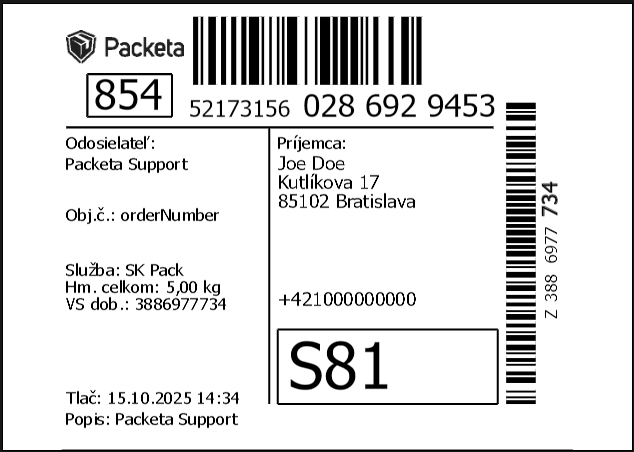
To download the label you need to use one of methods of calling the carrier's label: https://docs.packeta.com/docs/label-printing/carrier-label. For this example we will use <packetCourierLabelPdf()>.
<!--request-->
<packetCourierLabelPdf>
	<apiPassword>{{API_PASSWORD}}</apiPassword>
	<packetId>Z3886977734</packetId>
	<courierNumber>0286929453</courierNumber>
</packetCourierLabelPdf>

<!--response-->
<response>
	<status>ok</status>
	<result>JVBERi0xLjcKJeLjz9MKNyAwIG9iago8P.....NDU1PiBdID4+CnN0YXJ0eHJlZgo4ODE1NwolJUVPRgo=</result>
</response>
In the response you will receive the label in the .xml format. Once you decode it to .pdf you can see a label like this.
Packet Tracking
To track your packet outside the Packeta network you can use packetCourierTracking(). Together with packetTracking() you will be able to see the chronological overview of the statuses the packet has entered inside and outside the Packeta network as well as the current status.
Here you can find list of available Packeta statuses.
Times in Packeta web tracking, details are displayed in the Central European time zone (CET/CEST). Times in carrier tracking are shown in the carrier’s local time zone and may differ from details depending on the destination country.
In API tracking, the timestamp in packetTracking() may differ from packetCourierTracking(). Carriers usually use their local time zone. Packeta uses Central European time zone (CET/CEST) in packetTracking().
Example:
Packeta Tracking
<!--request-->
<packetTracking>
	<apiPassword>{{API_PASSWORD}}</apiPassword>
	<packetId>Z1436939952</packetId>
</packetTracking>

<!--response-->
<response>
	<status>ok</status>
	<result>
		<record>
			<dateTime>2025-10-01T23:59:57</dateTime>
			<statusCode>1</statusCode>
			<codeText>received data</codeText>
			<statusText>O vašej zásielke už vieme. Čakáme, kedy nám ju odosielateľ dodá.</statusText>
			<branchId>0</branchId>
			<destinationBranchId>0</destinationBranchId>
			<externalTrackingCode></externalTrackingCode>
		</record>
		<record>
			<dateTime>2025-10-02T00:00:08</dateTime>
			<statusCode>1</statusCode>
			<codeText>received data</codeText>
			<statusText>Zásielka bola pripravená na odovzdanie externému  dopravcovi SK Packeta Home HD, sledovací kód 0286929453.</statusText>
			<branchId>0</branchId>
			<destinationBranchId>0</destinationBranchId>
			<externalTrackingCode>0286929453</externalTrackingCode>
		</record>
		<record>
			<dateTime>2025-10-02T00:00:09</dateTime>
			<statusCode>1</statusCode>
			<codeText>received data</codeText>
			<statusText>Zásielka bola pripravená na odovzdanie externému  dopravcovi SK Packeta Home HD, sledovací kód 0286929453.</statusText>
			<branchId>0</branchId>
			<destinationBranchId>0</destinationBranchId>
			<externalTrackingCode>0286929453</externalTrackingCode>
		</record>
		<record>
			<dateTime>2025-10-08T16:28:27</dateTime>
			<statusCode>2</statusCode>
			<codeText>arrived</codeText>
			<statusText>Zásielka dorazila na depo. Zavar, Prílohy 699/87</statusText>
			<branchId>14256</branchId>
			<destinationBranchId>0</destinationBranchId>
			<externalTrackingCode></externalTrackingCode>
		</record>
		<record>
			<dateTime>2025-10-08T16:43:17</dateTime>
			<statusCode>6</statusCode>
			<codeText>handed to carrier</codeText>
			<statusText>Zásielku sme odovzdali dopravcovi SK Packeta Home HD. Sledovacie číslo: 0286929453.</statusText>
			<branchId>0</branchId>
			<destinationBranchId>0</destinationBranchId>
			<externalTrackingCode>0286929453</externalTrackingCode>
		</record>
		<record>
			<dateTime>2025-10-08T16:43:41</dateTime>
			<statusCode>6</statusCode>  <!-- Packet was handed over to external carrier -->
			<codeText>handed to carrier</codeText>
			<statusText>Zásielku sme odovzdali dopravcovi SK Packeta Home HD. Sledovacie číslo: 0286929453.</statusText>
			<branchId>0</branchId>
			<destinationBranchId>0</destinationBranchId>
			<externalTrackingCode>0286929453</externalTrackingCode>
		</record>
		<record>
			<dateTime>2025-10-09T14:58:00</dateTime>
			<statusCode>7</statusCode>
			<codeText>delivered</codeText>
			<statusText>Zásielka je doručená. Ďakujeme a tešíme sa na vašu ďalšiu zásielku.</statusText>
			<branchId>131</branchId>
			<destinationBranchId>0</destinationBranchId>
			<externalTrackingCode></externalTrackingCode>
		</record>
	</result>
</response>
External tracking
<!--request-->
<packetCourierTracking>
	<apiPassword>{{API_PASSWORD}}</apiPassword>
	<packetId>Z1436939952</packetId>
</packetCourierTracking>

<!--response-->
<?xml version="1.0" encoding="utf-8"?>
<response>
	<status>ok</status>
	<result>
		<record>
			<dateTime>2025-10-08T16:28:44</dateTime>
			<carrierClass>skremaxhome</carrierClass>
			<statusCode>1</statusCode> <!-- Packet was received by the external carrier-->
			<externalStatusName>Zásielku sme v poriadku prijali do prepravy a budeme ju doručovať nasledujúci pracovný deň.</externalStatusName>
			<externalNote></externalNote>
			<externalTrackingCode>51892669</externalTrackingCode>
		</record>
		<record>
			<dateTime>2025-10-09T08:07:37</dateTime>
			<carrierClass>skremaxhome</carrierClass>
			<statusCode>4</statusCode>
			<externalStatusName>Kuriér vyrazil na cestu a zásielka bude dnes doručovaná.</externalStatusName>
			<externalNote></externalNote>
			<externalTrackingCode>51892669</externalTrackingCode>
		</record>
		<record>
			<dateTime>2025-10-09T14:58:00</dateTime>
			<carrierClass>skremaxhome</carrierClass>
			<statusCode>5</statusCode>
			<externalStatusName>Zásielka je doručená. Ďakujeme a tešíme sa na vašu ďalšiu zásielku.</externalStatusName>
			<externalNote></externalNote>
			<externalTrackingCode>51892669</externalTrackingCode>
		</record>
	</result>
</response>
Didn't find what you're looking for? Reach out to our integration support team at integrations@packeta.com.